Claris FileMaker is the best custom application development platform available today. FileMaker allows organizations to quickly develop and deploy their own in-house applications with little or no coding experience. PBX is designed to extend the functionality of your FileMaker applications by integrating voice functionality in a few easy steps.
By integrating PBX with your FileMaker applications, you can do things like:
- Display FileMaker data instead of generic caller ID
- Automatically open a record when an incoming call is received
- Dial a phone number by clicking a button on a record
- Display a list of recent calls to a record's phone numbers
- Embed links to voicemails and call recordings into your records
- Run scripts based on call events
Twilio is the communications backbone of massive, bleeding edge applications in a multitude of industries. Twilio's customer base reads like an all star list of tech stocks: Uber, Lyft, Doordash, Stripe, AirBnB, Deliveroo, Box, VMWare, Dell, Salesforce, Yelp, Twich, Twitter, EMC, SurveyMonkey, eBay, InstaCart... the list goes on and on and on.
Twilio allows software developers to quickly and easily integrate communications features into their applications. It wasn't that long ago that if you wanted to write the ability to make and receive phone calls into your application, you'd need to invest millions of dollars into infrastructure, equipment and developers before you placed the first call. Twilio has cut through all the red tape with cutting edge APIs. By charging fractions of a penny per minute for usage (not for a number of phones, users, lines, or concurrent calls), Twilio has been able to crush the enormous barrier to entry that would typically prevent developers from building phone service into their applications.
Twilio also has features that allow non-developers to build custom call flows in a product called Twilio Studio. PBX integrates directly with Twilio Studio, allowing you to create pre-call announcements and IVRs (press one for sales, press two for service, etc).
In March of 2020, one of our customers approached us with a business problem. In 2019, they had launched a new inbound marketing division. They were using a few new channels to generate new business (internet, social media, direct mail, etc). Once their concept had been proven, they wanted to open it up to several more channels, do A/B testing and control their costs. That's when they realized they had a problem. They couldn't always tell where the business was coming from. The answer was really quite simple. By placing a different phone number on every ad, our customer was able to track every call to it's unique source.
Advertising is just the tip of the spear. PBX can be configured to give everyone in your organization a private business line or to give departments, products or teams a direct line of their own.
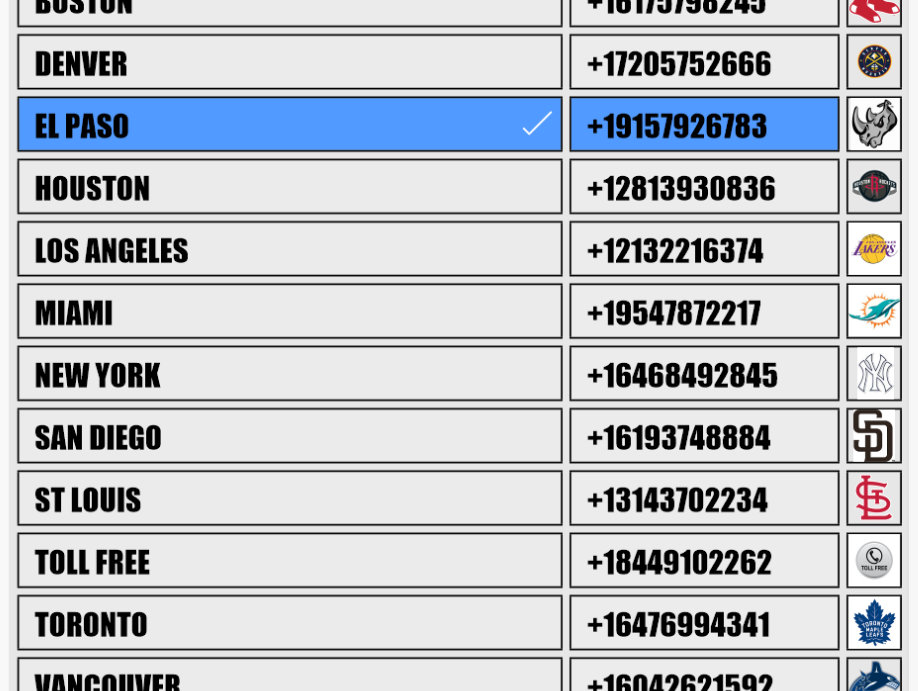
Mandelbrot PBX, MMS and SMS are designed to work with Twilio, where local US telephone numbers cost $1/month. Toll free numbers are $2/month. You can use as many or as few as you want. Need more numbers? Pick from thousands of numbers and reserve one for your exclusive use. Not using a number anymore? Release it and only pay for the numbers you're using.
Most phone solutions have a hard time integrating cell phones with land lines/VoIP phones. This is especially problematic when you have one phone number that rings a group of phones. Traditional systems deliver inbound calls to whatever device picks up first. If you have a mix of land line/VoIP and cell phones, that first device is often going to be the voicemail box of a cell phone that's turned off. This is because cell phones are designed for individual personal use, not as part of an office network. Here's an example.
Several years ago, one our best customers had a some VoIP and cell phones mixed together on the same inbound line. Everything was fine until an employee boarded an airplane during business hours. Because she was on a plane, she had to turn off her cell phone. When she turned off her phone, her phone's voicemail system became the first device to answer every inbound call. So, all the inbound calls to the customer's business went straight to her voicemail for the 3 hour flight. When she landed, she then had to spend the first few hours of her vacation calling customers and relaying messages. Not exactly ideal.
That situation doesn't happen with PBX. PBX is designed to work seamlessly with any mix of existing phones, even cell phones with dead batteries, no signal or set to "Do Not Disturb" (aka "DND"). The key to mixing together phone types is to weed out the cell phones that are off or set to DND. We developed a feature we call DND Bypass. DND Bypass is an artificial intelligence (AI) that detects if a human answered the phone or a voicemail. If the AI hears a voicemail, it hangs up that line and lets the other phones keep ringing. If it hears a human, it connects the call to the human.
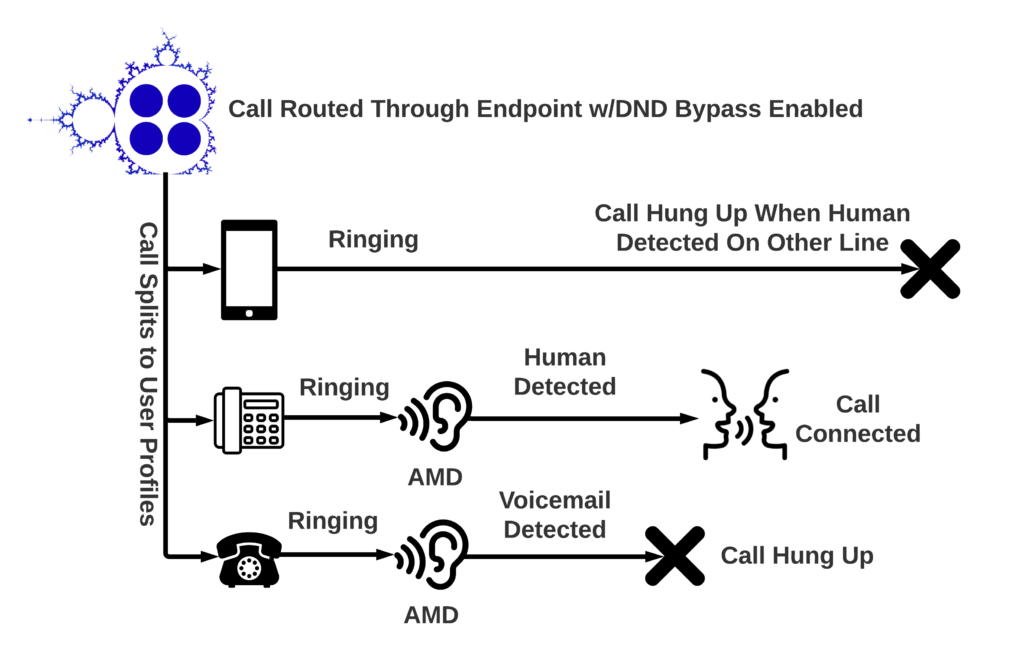
So what does all this DND Bypass AI stuff mean? It means you can put cell phones on your office network without fear of marooning callers in the voicemail box of a dead cell phone.
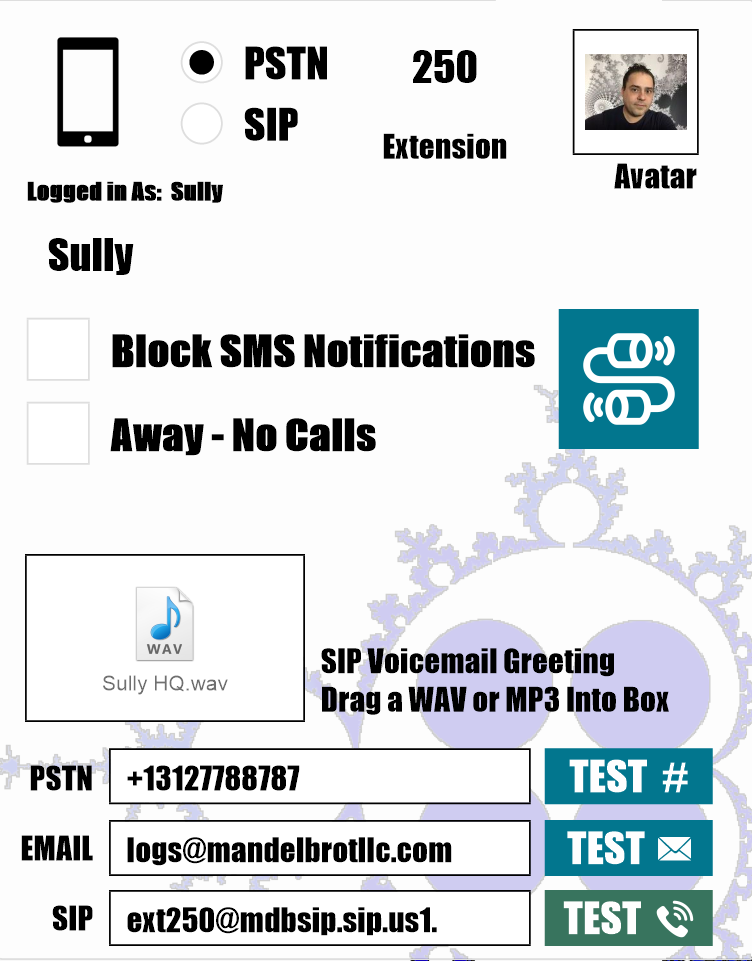
Additionally, you can set your location and preferences on the fly. On vacation? Set yourself to away. At your desk? Set your location to SIP and throw on your headset. Want to route your calls through your cell phone? No problem. Select PSTN, punch in your cell number and your calls will go there instead. Using Zoiper or Bria to turn your iPad or iPod Touch into a soft phone? Drop in your SIP credentials and you're set.
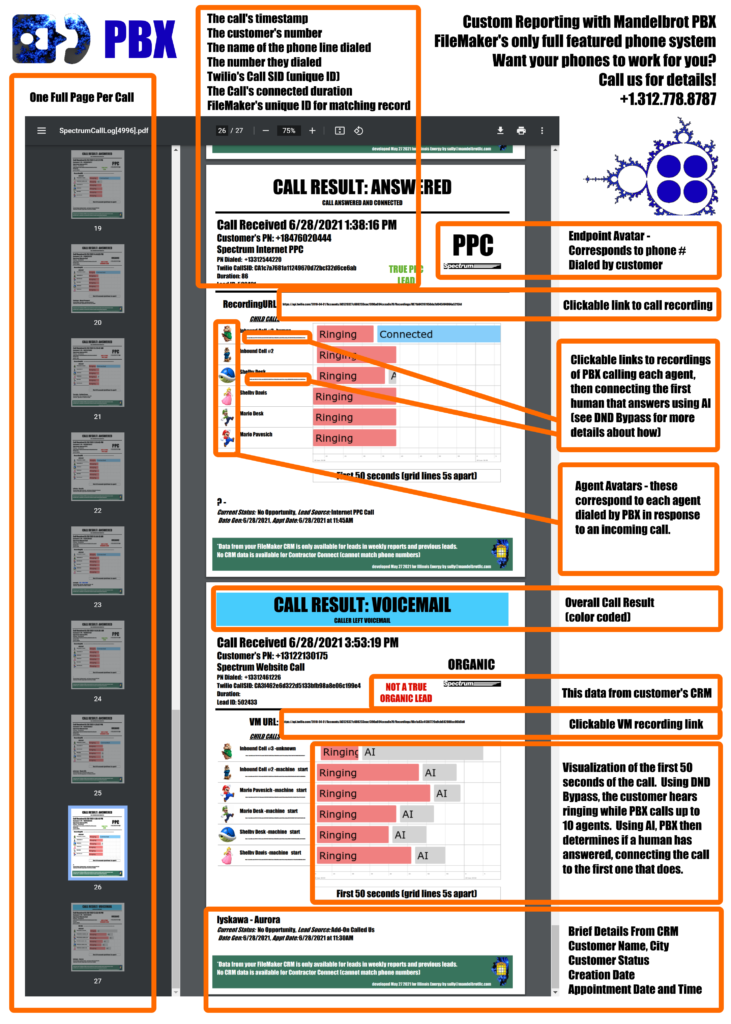
Without proof your teammates are performing, you can't really tell who to praise, emulate, congratulate or promote. With the Custom Reporting and Analytics addon for Mandelbrot PBX, you'll never doubt your teammates again. Each report is custom designed around your team's requirements. Here's a few examples from an inbound call center we took on as a Mandelbrot PBX customer.
Old habits can be hard to break. Despite the call center manager's best efforts, one of their most senior employees remained unwilling to fully embrace their new phone solution. Management asked us: how can we be absolutely 100% sure our new phone system is working? How can we tell if the system is dropping calls or if our employees are just making excuses? And how effectively are our people using the system?
The solution to these problems can be described in a single word: READABILITY. That's where the Custom Reporting and Analytics addon came into play. We set up a weekly email that contained the exact details they needed to hold their teams accountable, both from their database and from their new phone system. The report is a PDF file, which makes it easy to view or share on iPads as well as desktops. Every call is detailed by a full page, which allows their managers to easily clear up any confusion about how their phone system is functioning.
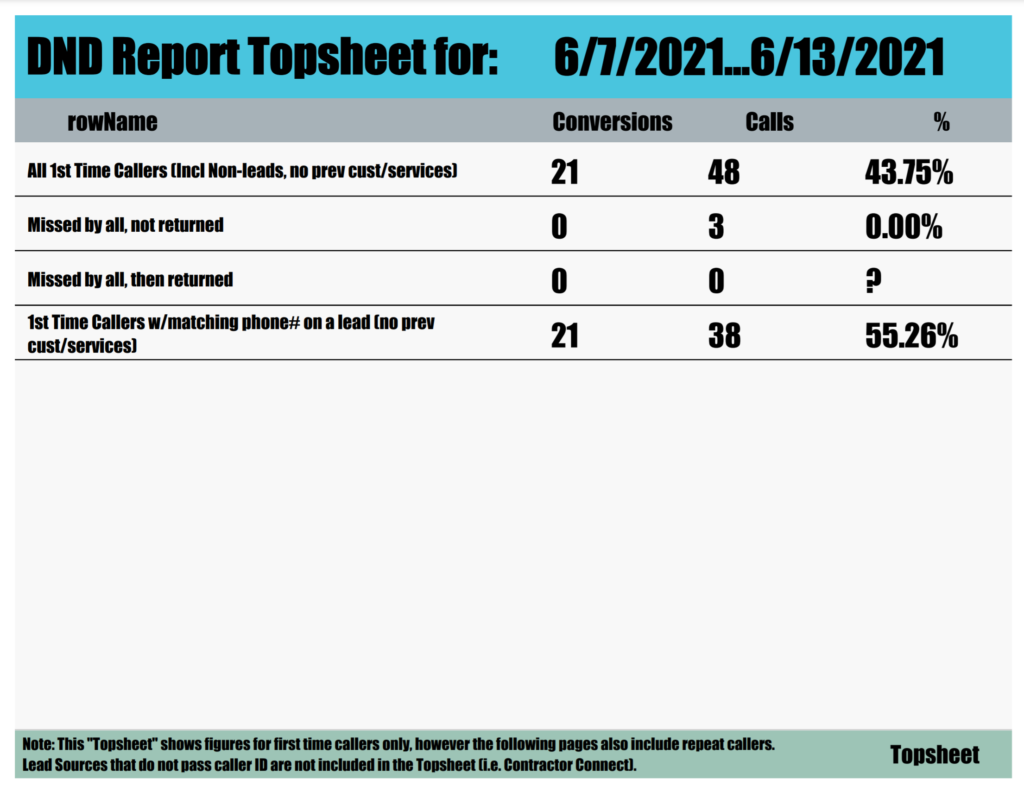
Company ownership also wanted a record of conversion rates for first time callers. By comparing the timestamp of each call to the creation timestamp of each corresponding record in their external FileMaker CRM, the wizards here at Mandelbrot were able to determine which phones were calling them for the first time. It wasn't that difficult to figure out – if a call came from an unknown phone number before the CRM record was created, it was a first time caller. This information allowed their business to focus their advertising effort on sources that produce new customers instead of paying twice for customers they already have in their CRM.
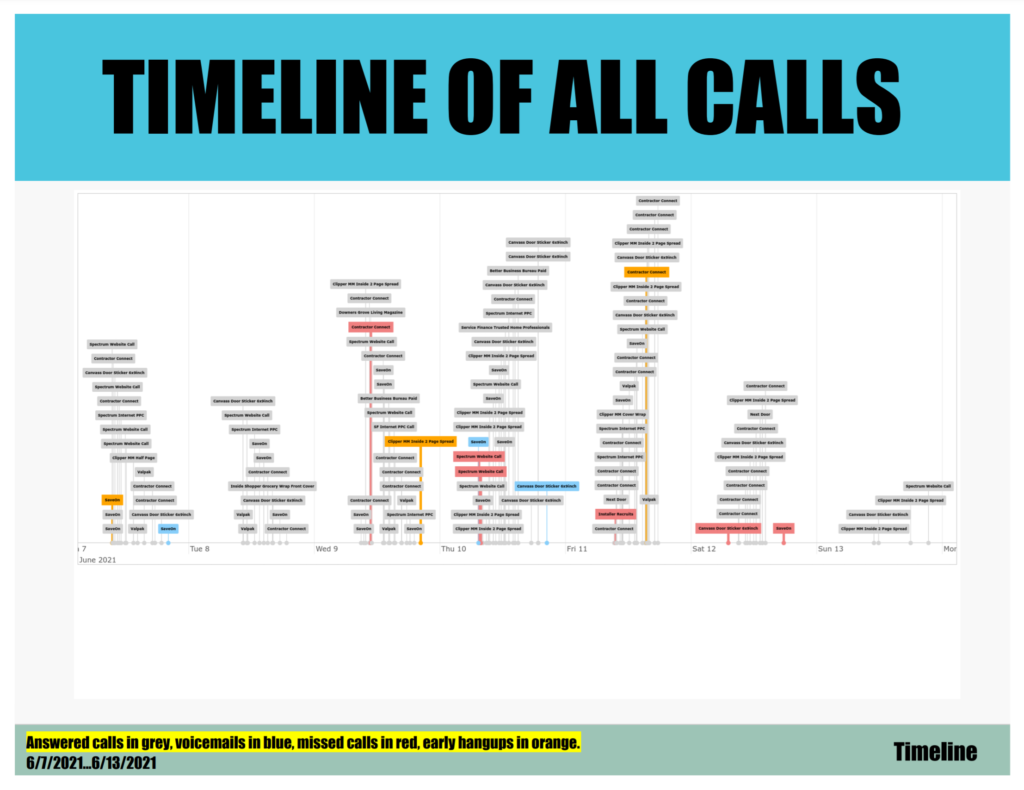
Lastly, their call center manager wanted a way to better schedule their agents. They didn't have a way of visualizing when the bulk of their calls were coming in, nor were they able to tell when calls were most likely to be missed. So we built them a color-coded visualization of each week's inbound calls. The calls are arranged on a timeline, from Monday thru Sunday. Color coding is as follows:
- Grey: Call was answered as normal.
- Orange: Caller hung up before voicemail greeting.
- Red: Caller hung up after voicemail greeting WITHOUT leaving a voicemail.
- Blue: Caller left a voicemail.
The results were stunning. The manager was able to adjust the call center's scheduling policy to match when calls were expected. Within a couple of weeks the company was missing far fewer calls. They also started calling people back even when there was no voicemail, which helped them get even more value from their advertising.
Never answer a call you don't recognize again. By looking up every inbound call in your FileMaker database or in Whitepages Pro Caller ID, PBX keeps you focused on the conversations that matter. If you're out of the office, PBX will text you the details of your inbound calls.
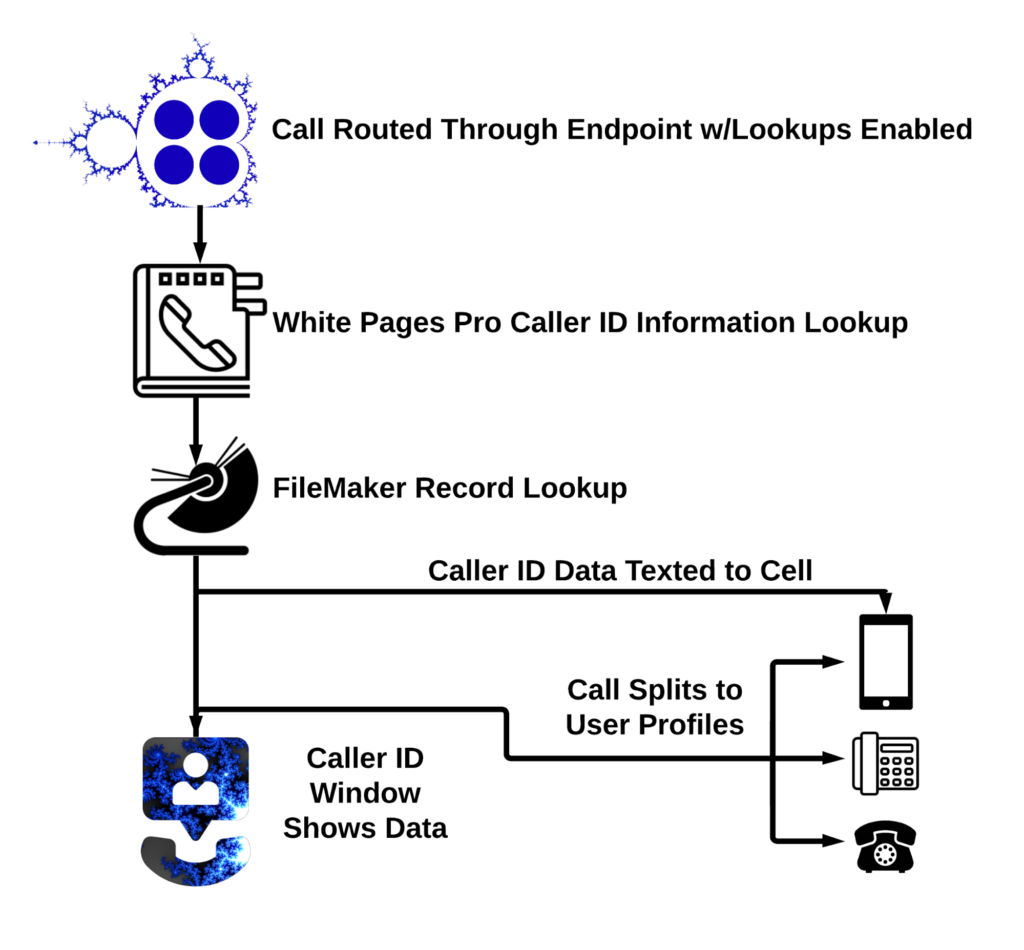
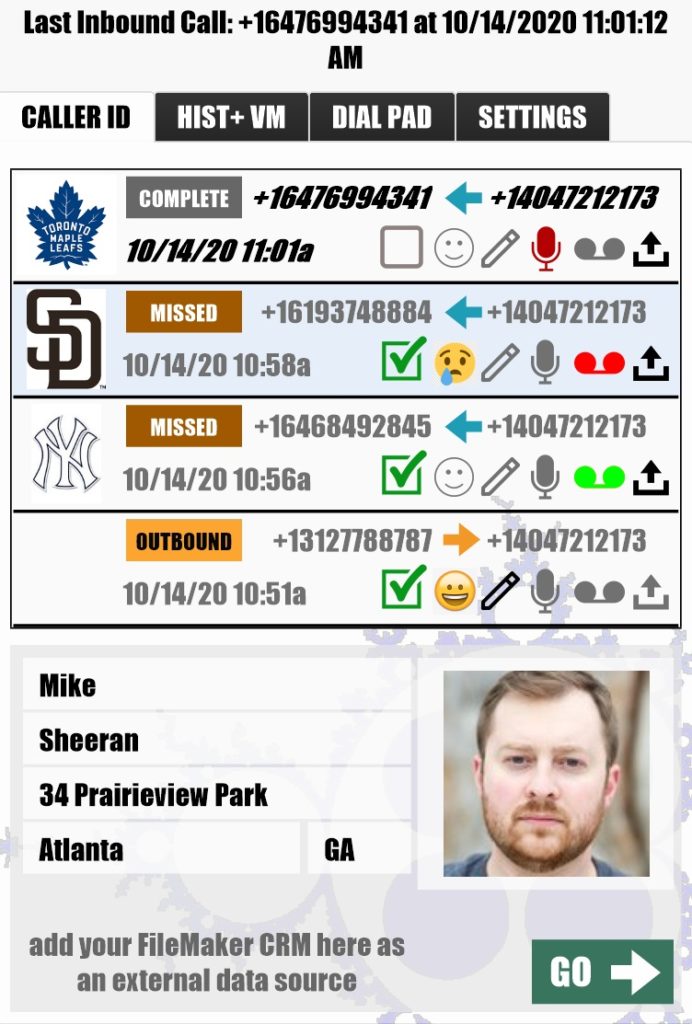
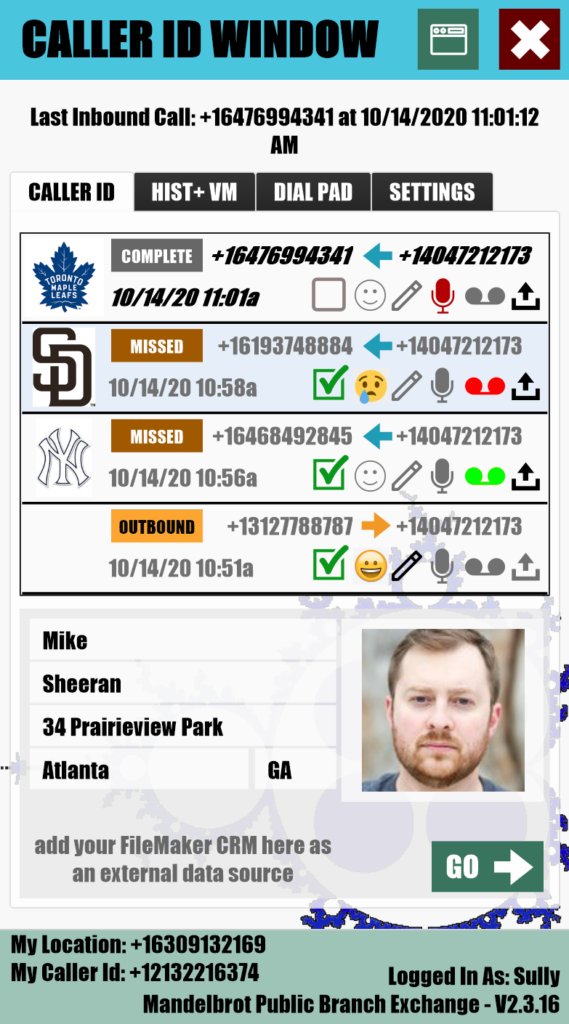
Or, if you're at your desk, use the included Caller ID Window to catch a glimpse of the caller's FileMaker record, view the caller's history, listen to or share voicemails and call recordings, add notes, indicate satisfaction and more.
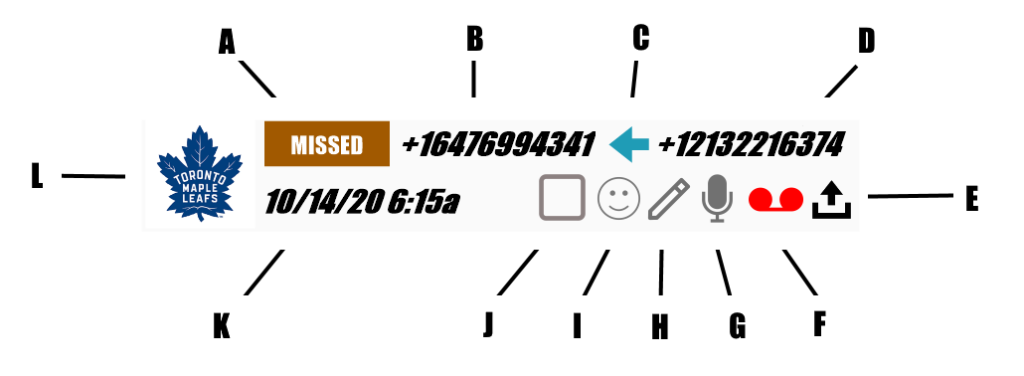
- A- Call Status (Direct, Outbound, Incoming, Missed, Answered, Complete)
- B- PBX Phone Number
- C- Call Direction (Inbound, Outbound, Internal)
- D- External Phone Number
- E- Share (Email or SMS link to voicemail or recording)
- F- Voicemail (Click to listen, color indicates who's listened)
- G- Call Recordings (Click to listen)
- H- Note (Click to edit)
- I- Smiley (Tracks satisfaction, click to edit)
- J- "Read" Checkbox
- K- Timestamp
- L- PBX Endpoint Avatar (helps user tell why caller is calling)
PBX is completely cloud based, allowing you to administrate your voice network from anywhere, anytime. By using avatars to help identify users and PBX endpoints, the process of routing calls becomes effortless.
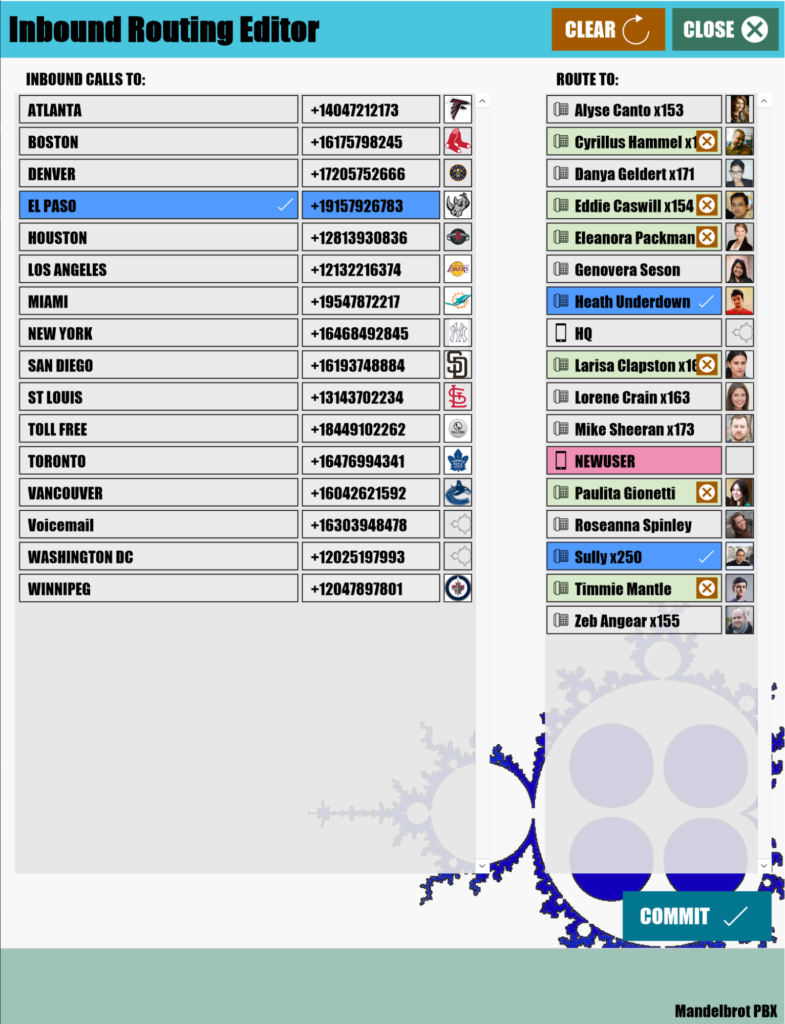
With our FileMaker based interface, even the most novice administrators can have their phone networks up and running in minutes.
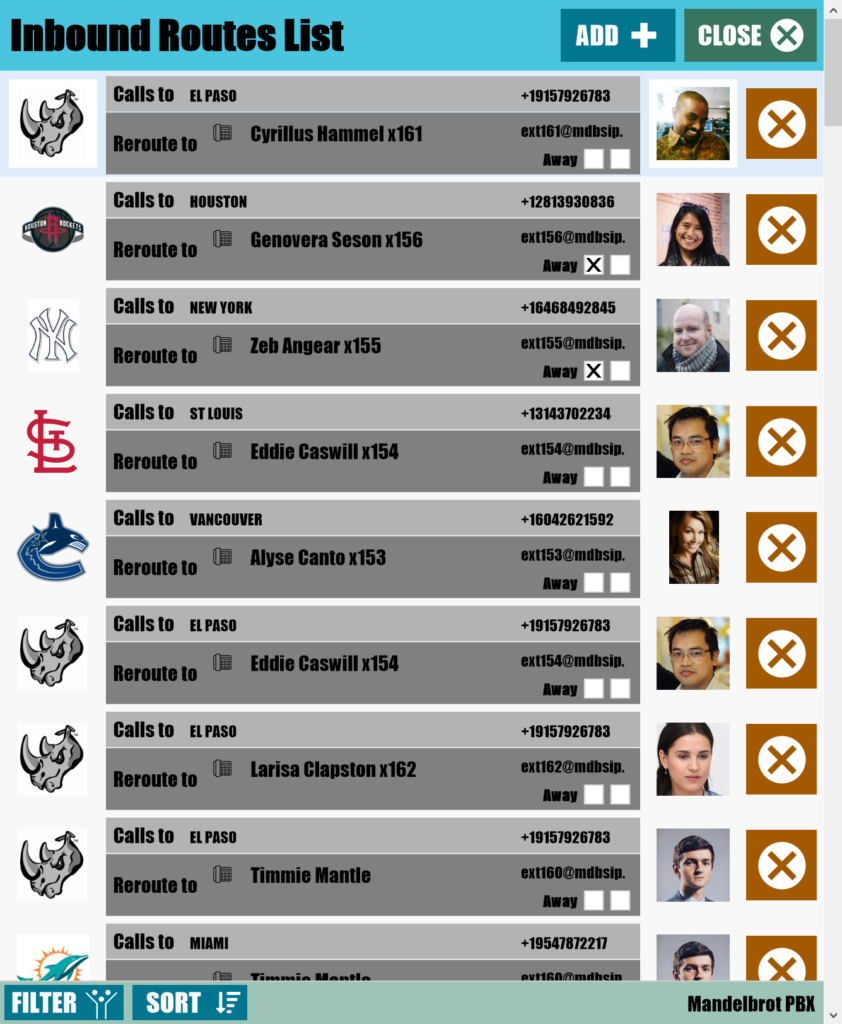
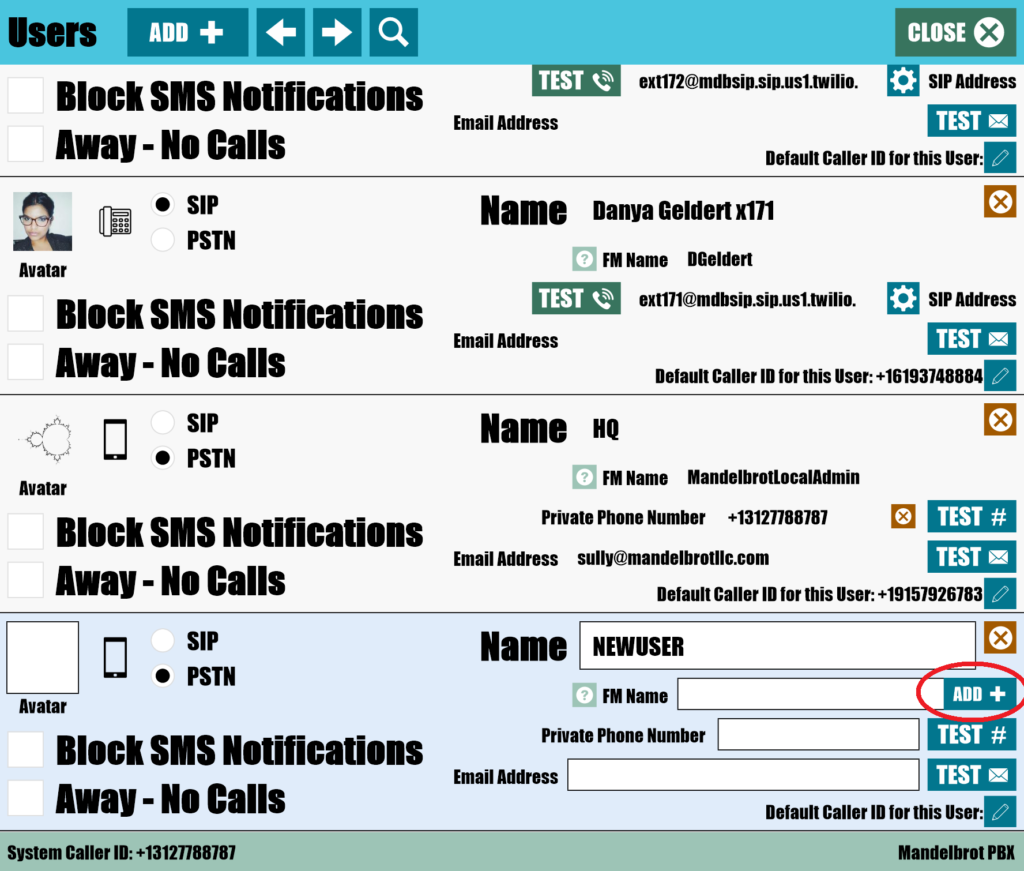
Select one of your PBX numbers and have it route inbound calls to up to ten users. View lists of where your calls are already routed to and set options for users.
PBX uses custom AWS Lambda webhooks to deliver information about your calls in real time. Because call data flows directly into PBX from the Twilio Supernetwork, users can opt to receive notifications when certain events occur or attach FileMaker scripts to create custom workflows.
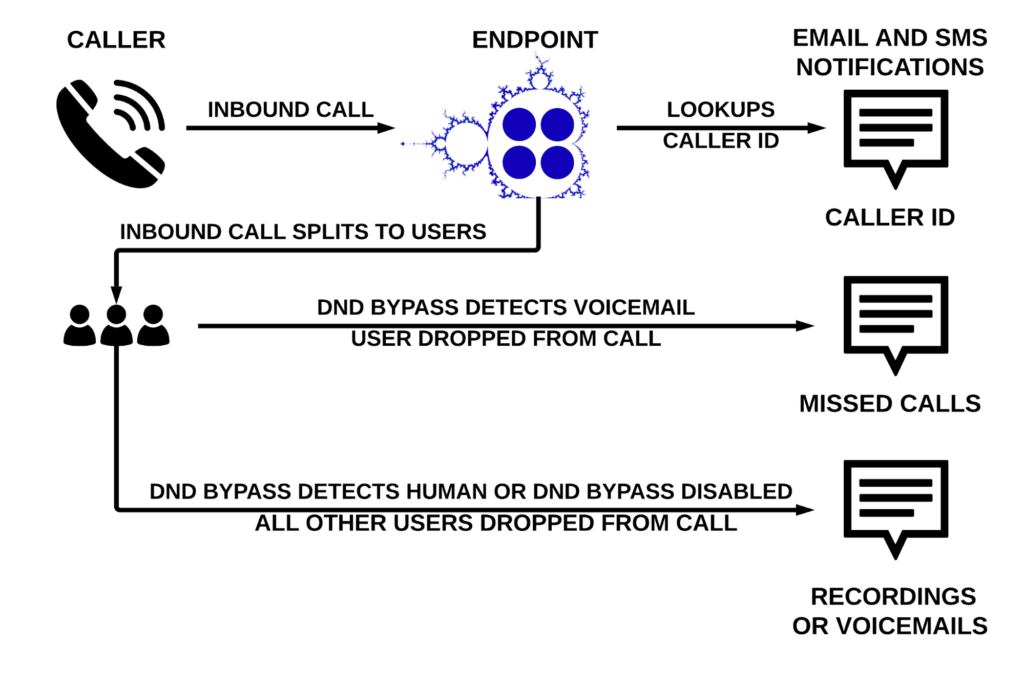
- Get a caller ID text message ahead of your inbound calls
- Email or text call recordings and voicemails to users
- Send recordings and voicemails to non-users
- Notify managers that a user did not answer a call
- Literally anything else you can do with a FileMaker script
Users and administrators can set their outbound caller ID by using PBX, which makes their private numbers stay private. First, set a default outbound caller ID in the admin console.
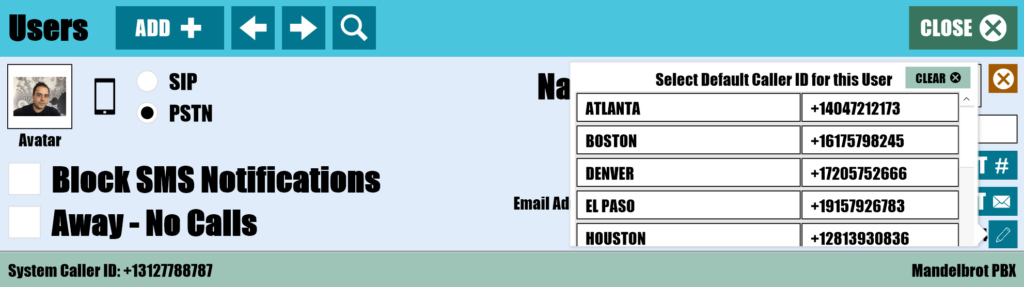
Then, use the dial pad to route calls through your phone using your business caller ID.
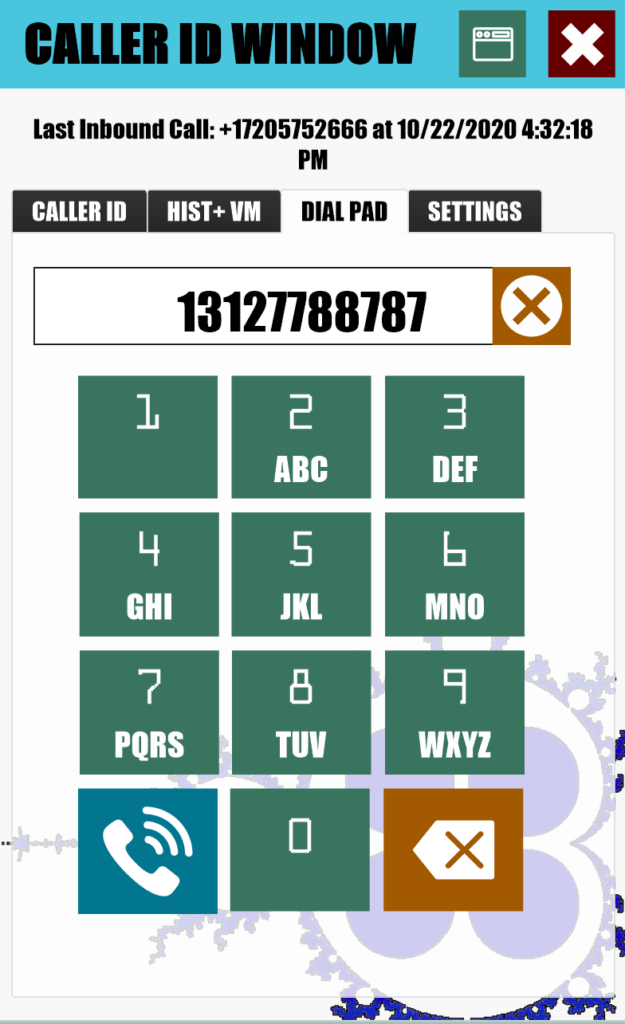
If you need more flexibility, use the included "PBX_Click_To_Call" FileMaker script to set your outbound caller ID to any owned or verified Twilio phone number.
For many organizations, answering answering every inbound call can be critical. But what do you do when someone in your organization doesn't answer their phone? If you're working in a team, this situation can be remedied by using the Automatic Call Forwarding endpoint option.

Automatic Call Forwarding diverts calls that are headed for voicemail to a different phone number instead. If desired, you can send the calls to another PBX endpoint. You can even stack up a few PBX endpoints in a "call cascade."
By using Automatic Call Forwarding, you can do things like:
- Divert a call that the overnight dispatcher missed to their manager
- Keep your receptionist from putting people on hold by forwarding calls to other employees
- Automatically transfer missed calls from your desk phone to your cell when you're out of the office
We all could use some help sometimes. PBX helps organizations by allowing others to coach callers in a couple of ways. The first way is by optionally recording both inbound and outbound calls to/from your PBX endpoint phone numbers.*
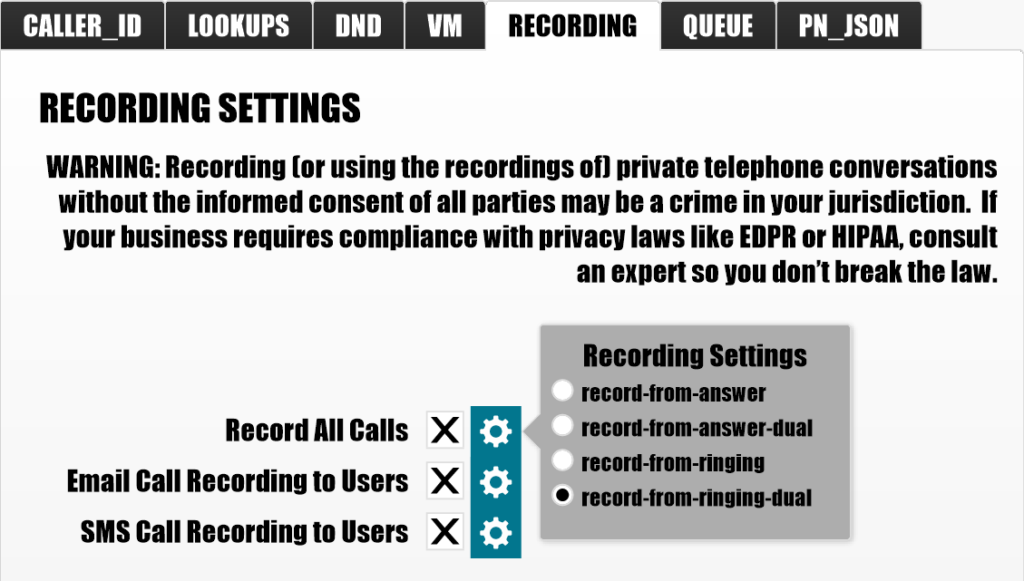
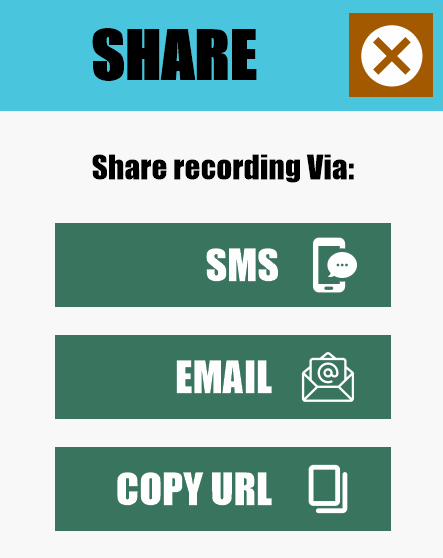
Once recorded, share recordings with your team via SMS, email or by copying the URL of the audio file.
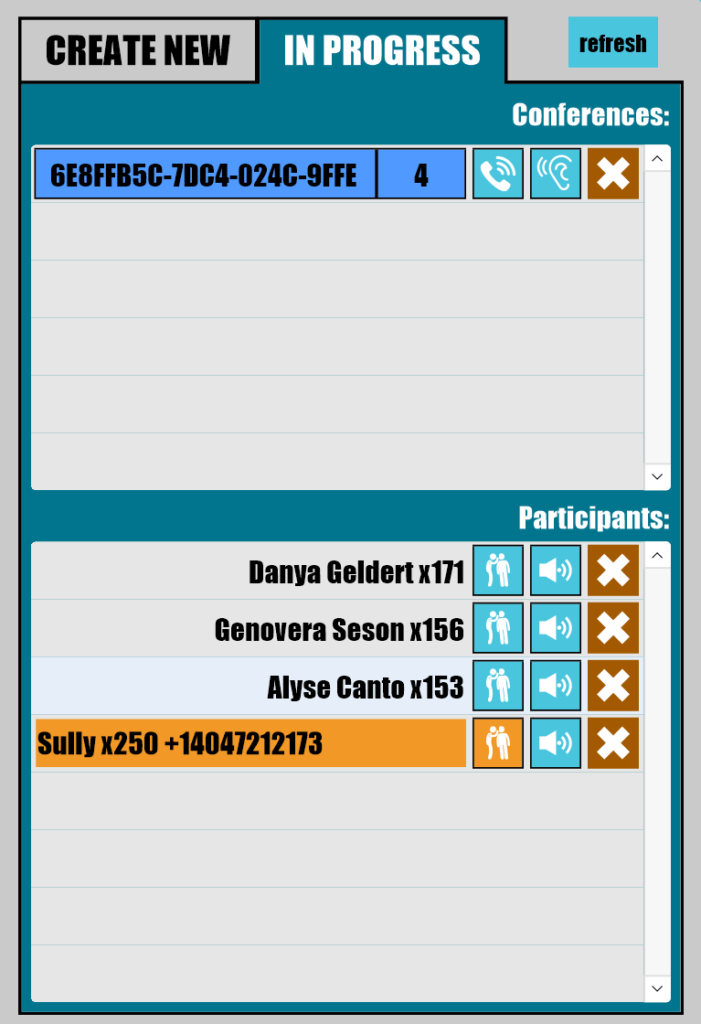
With a little planning, you can also coach live calls. First, create an outbound conference call in the admin console.
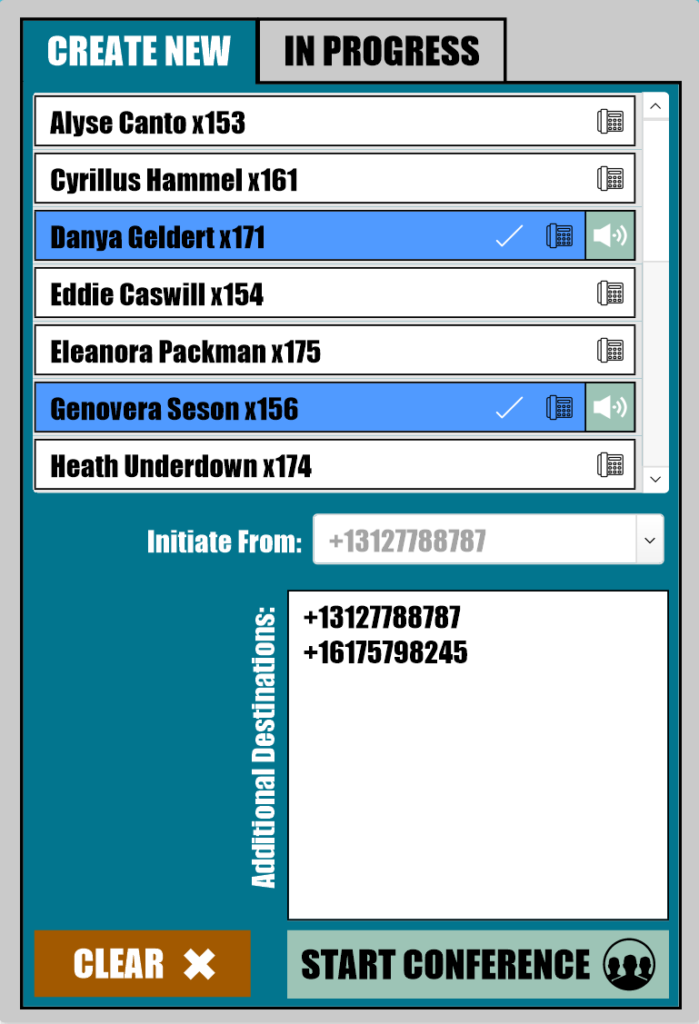
Once the call is live, click the whispering figure icon next to the conference participant you want to coach. PBX will call your phone and connect you to the conference when you answer. You will be able to hear everyone but only the participant you're coaching will hear you.
*Recording (or using the recordings of) private telephone conversations without the informed consent of all parties may be a crime in your jurisdiction. If your business requires compliance with privacy laws like GDPR or HIPAA, consult an expert so you don't break the law.
Almost everyone has been asked by someone at some point: "You got a pen handy?" This inevitably leads to lost interest, missed calls, voicemail, lost business and general unhappiness. Let's not do that anymore. Let's take that live caller and get them what they need RIGHT NOW by adding the participants to the call that your callers actually need. Everything you need to complete this miracle of modern telecomm is included in the Live Calls tab.
Here are a few ways you can add participants to a call.

"Blind transfer" is an industry term for a call where the transferring user sends the call to a destination user without notification. Blind Transfer is the most common way to transfer a call quickly that exists. What makes the Blind Transfers in PBX unique is that the transferring user can stay connected or hang up at any time without the caller or the destination being dropped from the call.
So- want to stay on the line and introduce the caller or start an ad-hoc conference call? No problem, just stay on the line after the destination call is answered. Need to send a call to a someone's voicemail box? Just hang up the call any time after the destination call starts ringing. Want to stay on the line with a nervous caller to make sure they don't get stuck in a voicemail box? Stay on the line with the caller, then disconnect the destination without dropping the call if it goes to voicemail.
This is all possible because all calls blind transferred by PBX are first converted to a conference. Then, the destination user is dialed into the conference. All participants can hear the sound of the destination user's phone ringing. As soon as the destination phone answers, everyone hears that too, whether it's the user you wanted or their voicemail.

Destination users can also be invited to join a live call in progress. The destination user will get a call with an automated message that informs them they have been invited. If they press any key, they are joined to the conference.

Users can be invited to silently observe a call in progress. Just like joining a call in progress, a conference is created. The destination user is called and asked via automated message if they want to join the conference. Pressing any key adds them as a silent observer.

The last user option is to invite a user to participate as a coach. This is the same as inviting a silent observer with one huge difference: the coaching participant will hear everyone but only the inviting user will hear the coach.

Sometimes non-users need to be invited to join a call. Dial the non-user's phone number into the number pad, then click the phone button to invite them to join as a normal conference participant.

Once joined to a conference, individual participants can be muted, unmuted and disconnected via the Caller ID Window with the click of a mouse or the tap of your finger.
Voice over IP (VoIP) phones use the internet to connect voice calls instead of using the Publicly Switched Telephone Network (PSTN). Since the internet is a cheaper, more efficient network, VoIP calls are cheaper than PSTN calls. Most hardware VoIP phones use Session Initiation Protocol or "SIP" to connect calls with VoIP.
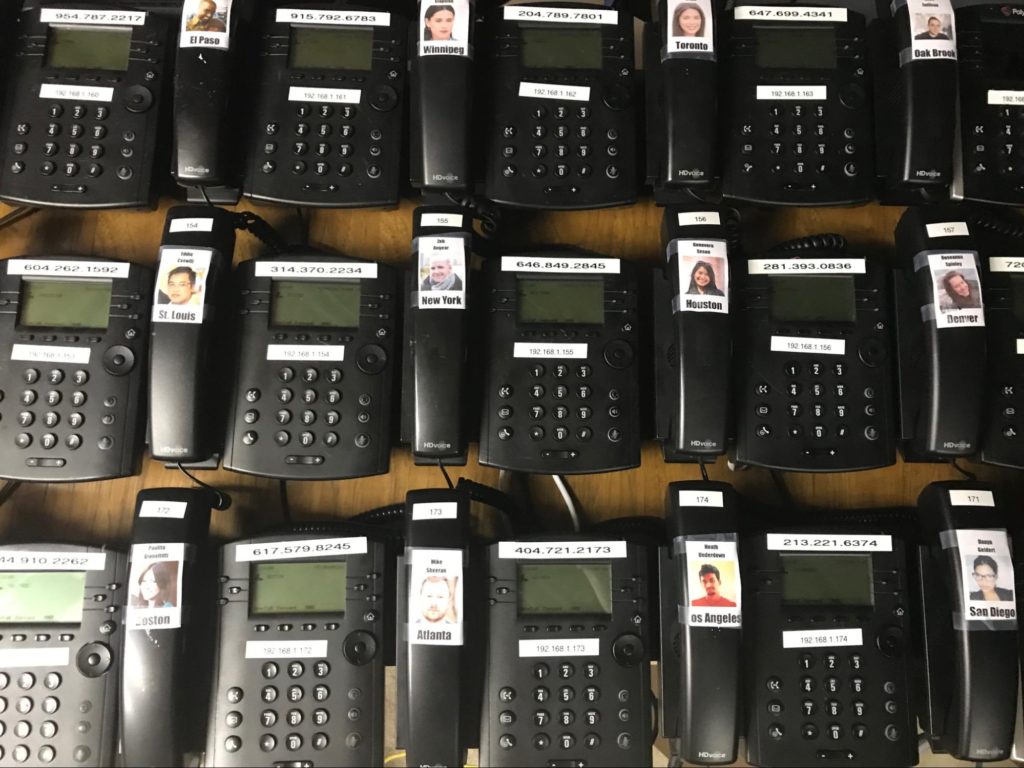
With PBX, set up SIP phones for any number of users. Then, give those users a three digit extension. This will let them call from SIP phone to SIP phone internally. Hand dialed calls will show the user's business outbound caller ID, adding privacy. Or, if you just want to save money and don't have SIP hardware, use free softphone apps like Zoiper or Bria to lower your costs.
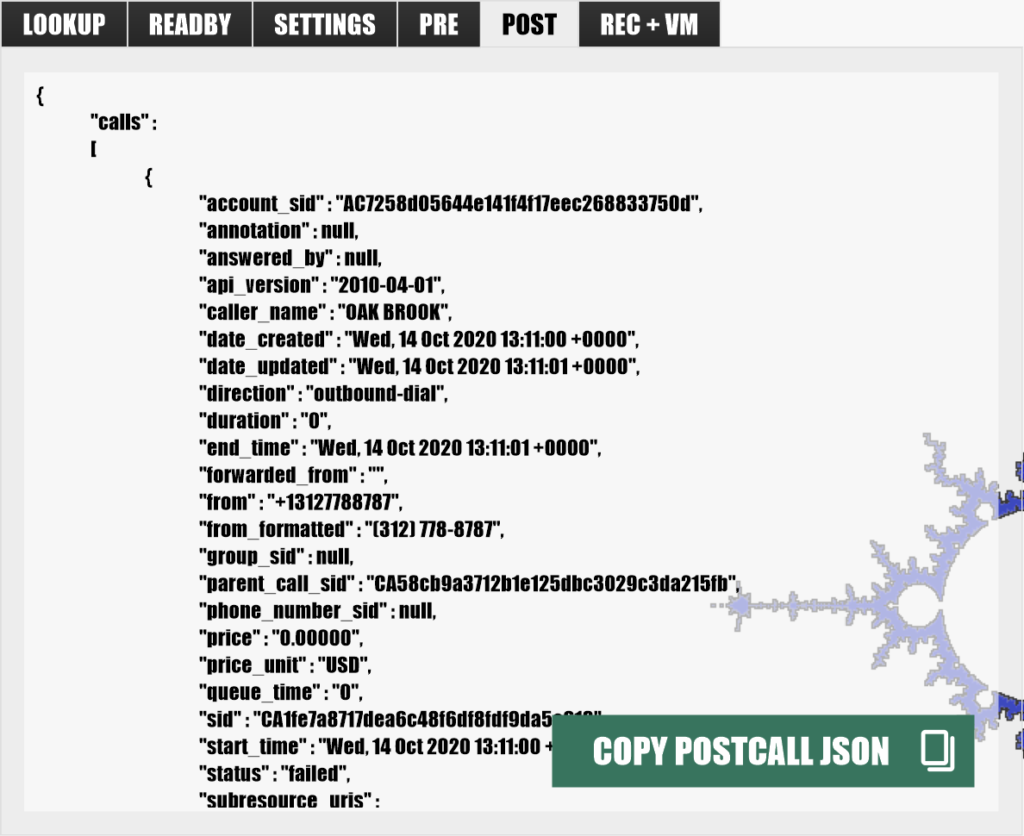
PBX automatically logs each call, including the Twilio call object JSON that developers need to create complex workflows. All of the information is saved in a FileMaker database in real time, which makes complex integrations far simpler.
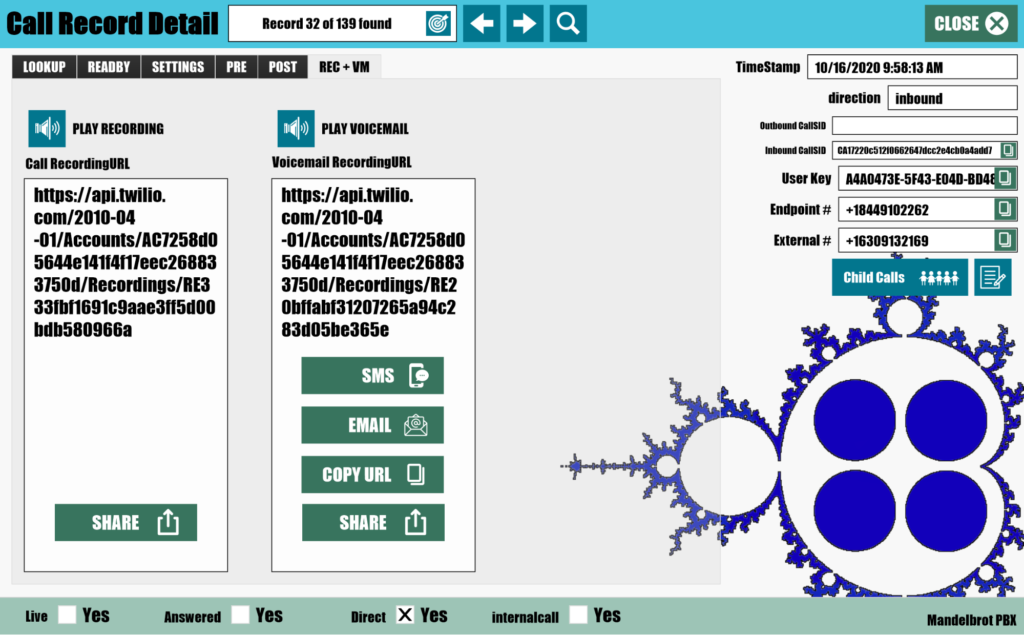
Logs also contain links to call recordings and voicemails.
Of course, all of these logs are in FileMaker, so creating custom reports is as simple as connecting to PBX as an External Data Source, then writing your reports however you want them.
The essence of teamwork is shared responsibility. Unfortunately, without PBX routing your calls, one teammate always ends up dealing with all the inbound calls. If that teammate isn't available, voicemails can pile up, leaving callers waiting days for a response to their marooned calls.
That is, until now. Now, with PBX, each endpoint has a Unified Voicemail box where any routed user can listen to the audio from your missed calls.
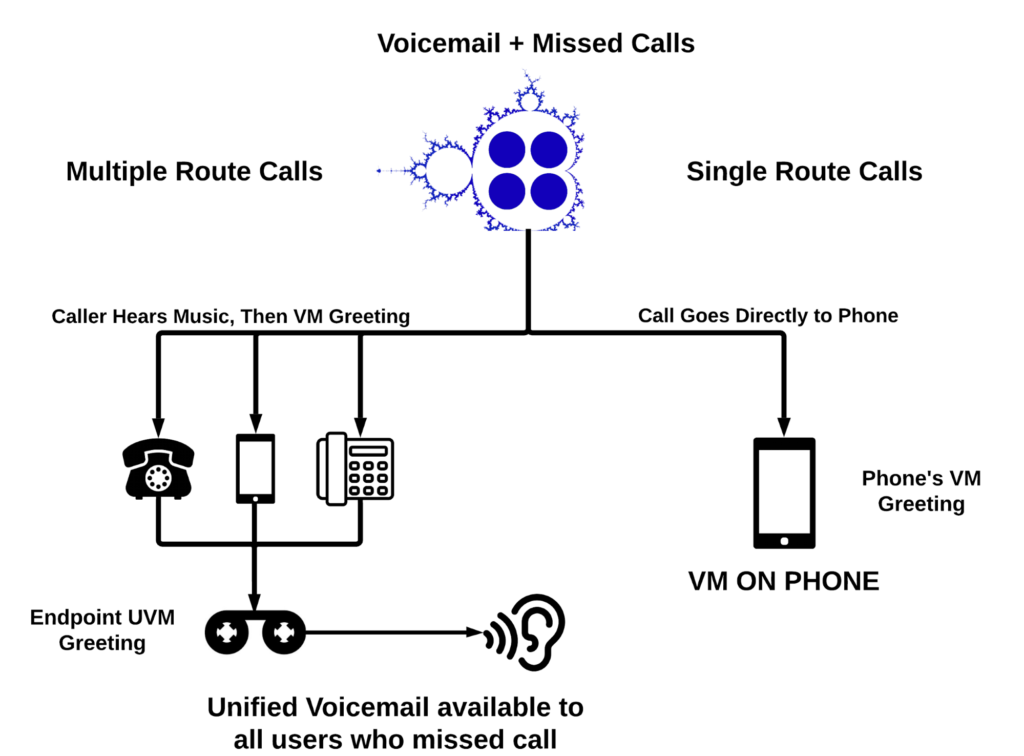
Teamwork also depends on communication. In the included FileMaker Caller ID Window, PBX users can add notes and use smiley faces to indicate the disposition of calls and callers.

The voicemail icon is also color coded so users can tell instantly if someone else has listened to a specific voicemail; red is new to everyone, yellow is new to you, green is heard, grey is no voicemail.
FOR MORE DETAILED INFORMATION ON MANDELBROT PBX, CONTACT US HERE.
Usually, people who write this kind of software want their customers to pay a monthly subscription per user. They also want their customers to fit their operations neatly inside the features they've built into their software. If the product doesn't have a feature, has the wrong features or has way too many features then you're just out of luck. Modifying that software to fit the way you do business is something that is rarely offered by large UCaaS players like RingCentral or Zoom. Maybe you can get a new feature if you're a humongous corporate client like McDonalds or JPMorgan Chase and you're willing to spend six or seven figures. But not at our scale.
Well, Mandelbrot is not your typical software firm. We are a custom software consultancy that is focused on products adjacent to FileMaker. We do have a few homegrown products we sell, but those products are really just templates we have built over the years. It's our collection of "reference cases", the benchmark set of code we have developed on our own time and our own dime. We use that code to jump-start your project so that we don't need to start your project from scratch.* This greatly reduces maintenance, delivery time and overall project costs by fast forwarding past all the biggest obstacles in development.
So how do we charge for PBX, a very complex template that's difficult to install and sometimes needs a very special tweak for a particular customer?
Here's what we've done in the past. We have a set price per hour for "dev hours". You pay for a small block (say 10 hours) up front. We then deduct from that block of hours to install and configure PBX. Once it's ready, any remaining hours can be used for any ongoing custom development, support or maintenance costs. You can always buy more dev hours if you need them. Once a year, we'll compare what you would have spent in lifetime monthly subscription fees to what you've already spent on dev hours. If you've spent less on dev hours than you would have on subscription fees, we'll bill you for the difference. Otherwise, you won't be asked to spend another dime on PBX.
So, that said, current pricing as of July 2025 is $14.50 USD per user-month and $225 per dev hour.
That said, in some cases your user count may be high enough that you might ask us to just build you something from scratch anyways. We'd be happy to. Just let us know up front and we'll go through our typical development cycle.
If a template plus a few tweaks is enough for you, however, we won't be surprised. PBX has a ton of great features that are already included. You may also want to consider that there is almost always something else you can build into your FileMaker solution. And, if you're already paying us for the dev hours, you might just want us to do that work for you.
Examples of common addon services:
- Webhooks
- API integrations
- Custom HTML and webpages
- Amazon Web Services (AWS) integrations
- Claris Connect replacement
- Voice recording consent logging
- Web-based phone client interface (no, not in webdirect)
- Custom integrations with existing or new FileMaker solutions
- Live configuration tutorials (you can record them if you want)
- SIP phone registration
- Remote administration and support
- Bespoke extensions and custom addons
- FileMaker hosting on AWS
- Mandelbrot MMS and SMS

*That jumpstart code does still belong to us. If that's a problem for you and you absolutely MUST own the code, we can work out a separate deal and we can write it from scratch for you as 'art for hire'.
need something less powerful and cheaper? send us a message and ask for 'PBX lite'